Pages

Saturday, 19 January 2013

Traffic Lights


Seeing that part of our map would be near a round I thought it would make the map more realistic by adding traffic lights. By manipulating a few cubes and cylinders I was able to create the shape you can see here. It was fairly simple to create so it didn't take that long to complete.
With help from the internet I was able to find a few images that would help me texture the model. By editing the images I found on the internet I was able to make this very realistic texture for my 3D model. The only part that isn't textured from using an online source is the poll itself which I simply just painted grey using Photoshop's paint tool.

To make the 3D model even more realistic, I decided to add the traffic light button panel as well.  By using the internet I was able to texture this panel with an actual picture of a traffic light panel, and then by using Photoshop I was able to line up the texture and the model so when I did apply it in Maya the texture made the model look realistic.


Friday, 18 January 2013

Speed Sign

Part of our map is above ground in a small town I decided to make some models for that. I made a speed sign that can be put next to the road to make it look more authentic. The model was really quick to make as it consisted of just two cylinders that I had manipulated to make the poll and the signs face.


I then created the texture in Photoshop and applied it to my model. I made two texture a 30 and a 40 mph speed limit sign to give the town some variety.

Thursday, 17 January 2013

Turnstile

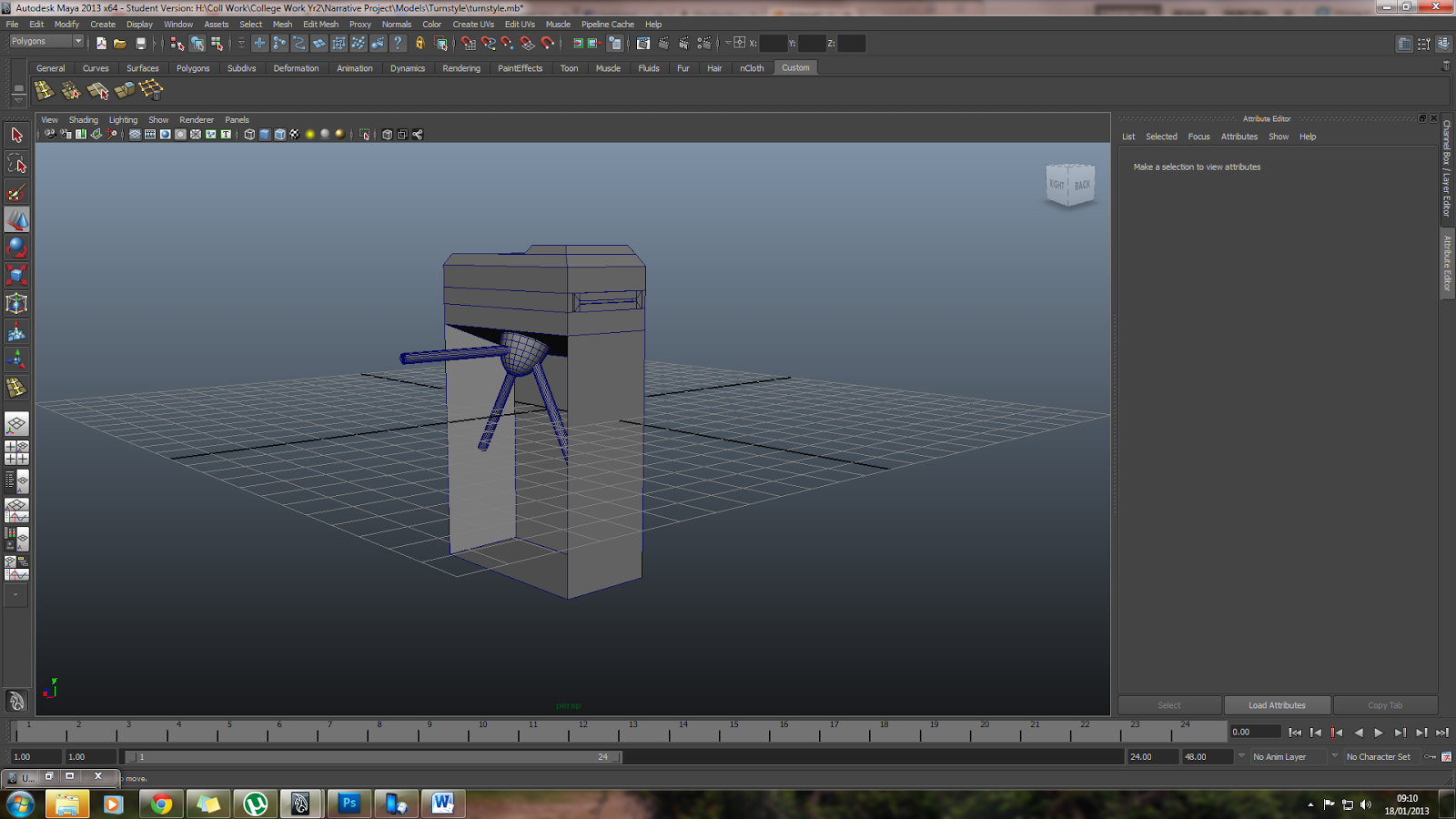
Here is a model of a ticket turnstile that you tend to find in train stations n subway systems. This model was fairly east to create. it is composed of three different meshes. The main body was simple a cube which was modified n manipulated shape you can see here, and then there is the a sphere and three cylinders that make up the the turnstile barrier. 
The texturing of this model was relatively easy all I did was map the uv's which took a few minutes, all I did was take a snapshot of the uv's and then place a metal texture that I found on the internet, and manipulated them so the corresponded to with each of the faces of the mesh.

Fire Exstinguisher

Here is my 3D model of a fire extinguisher. This model was very difficult to make as it was very complex at the top but after a lot of while my hard work had paid off and my model got to the point where I was happy with what I had produced.
Texturing this model was very difficult as the whole model was one mesh. Meaning I couldn't use the automatic mapping setting effectively. So what I had to do instead is map it in sections using a combination of planner mapping and cylindrical mapping to map the uv's and connect them correctly I then used Photo shop to apply the different colours and the instruction sticker.

Wednesday, 16 January 2013

Newspaper Dispenser

Here is a 3D model of a newspaper dispenser that I made. This screenshot shows the model without its texture. All I did to make this model was to create a polygon primitive cube and then manipulate the vertices to get the shape you see here. By using reference images off the internet I was able to create a very typical shape for the dispenser.


Here is the model after being textured. This process first started out by editing the uv's so each side of the model corresponded correctly. I then took a snap shot of the uv's into Photoshop, where I edited different images from the internet in correspondent with the snap shot of the uv's. I then saved this image and applied it to the model, to get this finished textured model that you can see here .


Here are the textures I made for the model. I also created a yellow and a red one by adjusting the hue/saturation in Photoshop to change the colour of the texture. This means when this model gets implemented into the engine the designer can create multiple objects which would vary in colour making it more realistic.


Platform Sign

Because we decided to set our map in an underground subway I decided to make some assets that would generally be in a subway like a platform sign. This 3D model was fairly easy and quick to make. It is simply composed of a modified cube and to small cylinders as mounting polls.

Here is the 3D model after being textured. Texturing this model was easy as well. After taking a uv snapshot I used the paint tool in Photoshop to paint certain faces grey and white, I then used the text tool to write the "Platform 1" text.

Tuesday, 15 January 2013

Table

Here is a quick 3D model of a table that I made in Maya. This is the first model I made for this project, it was really just to practice and hone up on my skills and understanding of Maya as I had not used it for a very long time. After brushing up on Maya the next step was to texture, it but as most of the class were unfamiliarly with this step Simon did a short tutorial showing us how to do it correctly.
I then moved on to texturing after having a tutorial form Simon showing us how to uv and texture, I tried doing it my self and this was what turned out after my attempt. I was fairly happy with the outcome seeing as this was my first try at texturing a 3D model.